Quiet Sounds: The Bold Display Font That Commands Attention
There's a particular challenge in design work that many professionals recognize: the need for typography that carries weight without shouting. We've all encountered projects where a headline needs to land with authority, where a brand mark requires instant recognition, or where a poster demands visual magnetism. This is precisely where Quiet Sounds enters the conversation—a premium display font engineered for moments that call for unmistakable presence.
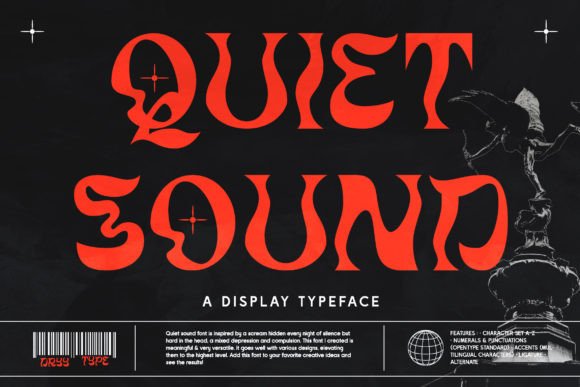
Let's be straightforward about what makes this typeface worth your attention. Quiet Sounds features bold, angular letterforms with a distinct personality that refuses to blend into the background. The strokes carry a confident weight, and the geometric underpinnings give each character a structured, intentional quality. There's a modern edge here, but it doesn't chase trends that'll feel dated in eighteen months. Instead, the font occupies that valuable space between contemporary relevance and timeless boldness.
Where This Display Font Truly Shines
Understanding where a typeface performs best saves you time and prevents mismatched projects. Through practical application, Quiet Sounds proves particularly effective in several contexts worth exploring.
Headlines and hero text represent the most natural home for this font. When you're designing a landing page, crafting a magazine spread, or building a presentation deck, the opening line sets the entire tone. Quiet Sounds delivers that initial impact with authority. The letterforms hold their ground at large sizes, maintaining clarity while projecting confidence. I've seen designers pair it against clean sans serif body text, and the contrast creates an immediate visual hierarchy that guides the reader's eye exactly where it needs to travel.
Logo design and brand identity work benefits enormously from typefaces with distinctive character. A logo needs to function across business cards, website headers, merchandise, and signage—often simultaneously. The bold construction of Quiet Sounds translates well across these applications. It's worth noting that the font's personality leans assertive, which suits brands positioning themselves as confident, innovative, or premium. For a boutique agency, an independent coffee roaster, or a tech startup launching a disruptive product, this kind of typographic voice aligns naturally with brand strategy.
Poster design, event materials, and editorial layouts demand fonts that perform under visual pressure. Think about a music festival poster competing for attention on a cluttered bulletin board, or a book cover sitting among hundreds of thumbnails in an online marketplace. Quiet Sounds handles these high-stakes environments effectively. The angular details and bold weight create visual texture that catches the peripheral vision, drawing viewers closer.
Packaging design presents another compelling application. On a crowded retail shelf, products have roughly three seconds to communicate their identity. A distinctive display font on the primary label or box face can make that critical difference. The character of Quiet Sounds suggests craftsmanship and intentionality—qualities that resonate with consumers evaluating artisanal goods, specialty beverages, or premium personal care products.
Practical Considerations for Working With Quiet Sounds
Choosing the right typeface involves more than aesthetic preference. Here's how to evaluate whether this font fits your specific project.
Start with your audience and message. The visual personality of Quiet Sounds communicates boldness and modern confidence. If your project targets a demographic that values contemporary design sensibility—millennials and Gen Z professionals, creative industry audiences, or design-conscious consumers—this alignment works in your favor. Conversely, if you're designing materials for a traditional law firm or a heritage luxury brand seeking understated elegance, you might explore serif font alternatives with more classical proportions.
Test font pairings before committing. Display fonts rarely work alone. You'll almost certainly need a complementary typeface for body copy, captions, or supporting information. Quiet Sounds pairs well with clean sans serif fonts that offer visual breathing room—think something with open letterforms and moderate x-height. The contrast between the bold, angular display face and a neutral text font creates rhythm in your layout. Avoid pairing it with other heavily stylized typefaces, as competing personalities create visual noise rather than harmony.
Explore the full character set. One practical advantage of this typeface is its PUA encoding, which means every glyph, alternate character, and decorative swash is accessible through standard design software. This matters more than you might initially think. Those extra characters give you flexibility to customize headlines, create monogram-style initials, or add flourishes that differentiate one project from another—even when using the same base font. Spend time exploring what's included before settling on default letterforms.
Readability deserves honest assessment. As a display font, Quiet Sounds prioritizes visual impact over extended reading comfort. This isn't a weakness—it's intentional design alignment with its purpose. Use it for headlines, titles, short callouts, and branding elements where brevity meets impact. Reserve longer passages for a well-chosen serif font or sans serif font optimized for sustained reading. Respecting this boundary ensures your typography serves the reader rather than frustrating them.
Licensing covers commercial use. For entrepreneurs, small business owners, and agencies working on client projects, licensing clarity matters. Quiet Sounds comes with commercial licensing, which means you can deploy it across client work, product packaging, digital campaigns, and branded merchandise without navigating complicated usage restrictions. This practical consideration often gets overlooked during the excitement of discovering a new creative font, but it prevents headaches down the road.
Making the Most of Bold Typography in Your Projects
Beyond selecting the right typeface, strategic implementation amplifies results. Here are observations drawn from practical design experience.
Give your display text room to breathe. When using a bold typeface like Quiet Sounds, generous spacing around headlines prevents visual overcrowding. White space isn't wasted space—it's the frame that lets bold typography register as intentional rather than overwhelming. In web design contexts especially, adequate padding around hero text improves both aesthetics and user experience.
Consider color contrast carefully. Bold, angular fonts carry inherent visual weight. Pairing them with high-contrast color combinations—dark text on light backgrounds or reversed white text on saturated colors—ensures the letterforms maintain their definition. Low-contrast combinations can muddy the sharp edges that give this typeface its character.
Use consistency strategically across brand touchpoints. When you adopt Quiet Sounds as part of a brand identity system, apply it consistently across social media graphics, website headers, email templates, and printed collateral. This repetition builds recognition. Audiences begin associating that specific typographic voice with your brand before they've consciously registered the letterforms themselves. That's the kind of subconscious brand recall that translates into real business value.
Quiet Sounds represents a specific tool for specific jobs. It won't solve every typographic challenge you face, and it shouldn't try to. But for projects demanding boldness, distinctiveness, and modern visual authority, it delivers exactly what the moment requires. Evaluate it against your actual project needs, test it in context, and let the letterforms speak for themselves.